Schedule 1 Mods: Current Picks, Branch Checks, and Install Notes
For schedule 1 mods, choose the change you want, then match the package to your game branch before installing it. Start with Driver Employees for automated deliveries, Employee Manager for staff control from a floor plan, or NACops for raids and a more configurable police system. NACops has separate Mono and IL2CPP builds; its package page maps default/beta to IL2CPP and alternate/alternate-beta to Mono.
The branch mapping and install notes below are specific to the linked packages checked on October 31, 2026. Recheck their pages before installing because package versions and instructions can change.
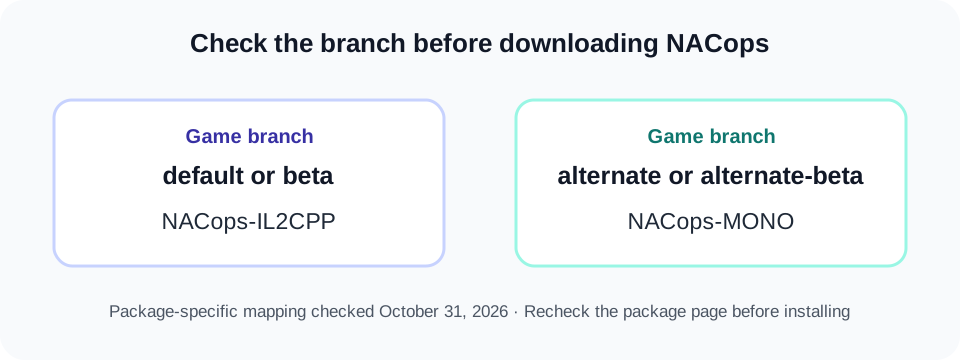
<figure class="diagram"><img src="/schedule-1-branch-check.svg" alt="Choose a Schedule I branch first: default or beta uses the NACops IL2CPP package; alternate or alternate-beta uses NACops Mono." width="960" height="360" decoding="async"><figcaption>This mapping is for NACops only; use each mod’s own branch and dependency notes.</figcaption></figure>
Pick a mod by the change you want
| If you want… | A starting point | What its listing says | Check before installing |
|---|---|---|---|
| Drivers to handle deliveries and errands | Driver Employees | Its listing describes autonomous drivers that move supplies, collect orders, meet dealers, and support custom routes. | Read the current package requirements and match its build to your game. |
| Staff controls from a floor plan | Employee Manager | Its listing describes managing staff and properties from an in-game floor plan and phone. | Check its current requirements and changelog before adding it to a save. |
| More police pressure and property raids | NACops | Its package page describes raids, private investigators, surveillance, and configurable police activity. | Choose the Mono or IL2CPP build that matches the branch you launch. |
| A shared library used by another mod | S1API Forked | The package describes itself as a Mono/IL2CPP compatibility layer. | Install it only when the mod you chose lists S1API as a requirement. It is a dependency, not a gameplay pick by itself. |
Nexus Mods’ Schedule I page is useful for browsing its mod and collection listings. Thunderstore’s Schedule I page is a separate package directory with filters such as Mono, IL2CPP, libraries, and modpacks. Treat those pages as catalogs; open the individual package page for its branch, dependencies, and install details.
Match NACops to the game branch
The NACops package’s installation section gives this mapping:
| Game branch shown by the package | NACops package build |
|---|---|
default or beta | NACops-IL2CPP |
alternate or alternate-beta | NACops-MONO |
Do not generalize this table to every Schedule I mod. It is the mapping documented for NACops. Its page also says the package requires Melon Loader. For a manager install, the package says to install NACops through the manager; for a manual install, the page currently specifies Melon Loader 0.7.3 for Schedule I.
For the manual NACops route, the checked package instructions say to put the contents of its Mods folder in Schedule I/Mods, and its UserData contents in Schedule I/UserData. The package also uses different configuration folders for the two builds:
- Mono manager profile:
UserData/XO_WithSauce-NACops_MONO/XO_WithSauce-NACops/ - IL2CPP manager profile:
UserData/XO_WithSauce-NACops_IL2CPP/XO_WithSauce-NACops/ - Manual install:
UserData/XO_WithSauce-NACops/
If the configuration you expect is missing, check which build you installed and which profile directory that build uses before reinstalling everything.
Two NACops details that change how you test it
NACops adds a property-heat system. Its checked page says heat above 12 decreases by 1 each in-game day, and a raid resets the property’s heat to 0. Those are NACops rules, not general Schedule I rules.
The package also lets players build patrol routes and sentry positions. Its instructions say a new build is applied after returning to the main menu and reloading the save, or after exiting and launching the game again. If a route does not appear immediately, follow that reload step before editing the configuration again.
When S1API is needed
S1API Forked describes itself as a cross-compatibility layer for Schedule I’s Mono and IL2CPP modding. Its page says you need it when a mod you use depends on S1API; it is not required for every mod. Check the individual mod’s Required section instead of installing every library listed in the directory.
For manual S1API installation, the checked page says to download and extract its ZIP, then copy both Plugins and Mods into the Schedule I game folder (typically C:\Program Files (x86)\Steam\steamapps\common\Schedule I\). To remove it, delete the associated files from those two locations. For S1API errors, the maintainers direct users to open an issue on the linked S1API GitHub project.
A short install check
- Note which Schedule I branch you launch.
- Open the exact mod page and read its branch/build,
Required, and install sections. - For NACops, use the branch table above; for other packages, follow their own instructions.
- Add one package and its listed dependencies, then test before adding another. Keep a backup of a save before testing a large overhaul.
- If a mod fails, record its package version and game branch, then use the package’s own troubleshooting or issue link.