Phasmophobia Steam Guide: Voice Recognition, Text Mode, and Steam Deck
Yes—Phasmophobia is available on Steam for Windows and remains in Early Access. Steam also labels it “Playable” on Steam Deck. The Steam-specific detail worth checking is voice: team chat, the microphone path that lets the ghost hear you, and text-based Spirit Box input have had separate fixes and controls. This guide separates those paths and dates each update.
Quick answer
- PC: The Steam listing is the Windows Early Access build. If ghost voice recognition on the “Voice” setting fails, Kinetic Games’ June 2026 hotfix says to make the microphone selected by Phasmophobia match the default microphone in Windows.
- Steam Deck: Steam’s compatibility label is “Playable.” A later official patch fixed voice chat failing at the start of a contract; that is a different issue from ghost voice recognition.
- No-mic or text input: The August 2026 update lets you use Text Voice Recognition with a Spirit Box without holding it. Kinetic Games’ late-November Resonance preview also describes new ghost commands, including routes for Text mode and VR.
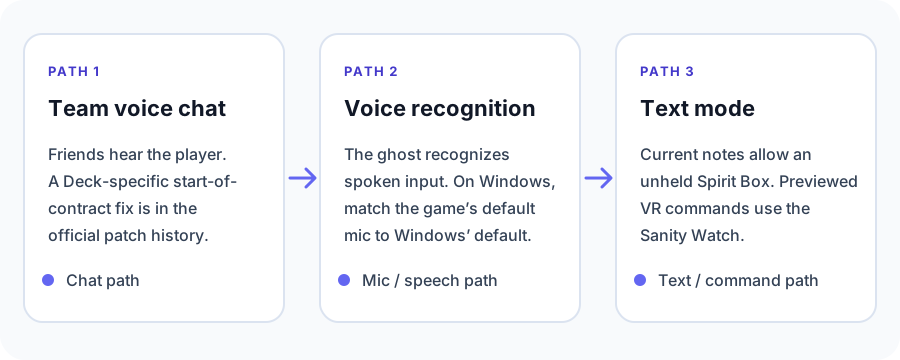
Steam Deck “Playable” does not answer the voice question
Steam’s current listing marks Phasmophobia as Playable on Steam Deck. That answers whether Valve considers the game usable on the handheld; it does not mean every voice feature follows the same path. A player hearing your team chat is not the same test as the ghost recognizing a spoken question.
Kinetic Games’ older notes make that distinction explicit: an update restored Deck voice chat and let the ghost hear Deck players, while listing Vosk voice recognition as a known issue at that time. Later Deck and Steam fixes followed, so treat that note as historical context rather than a claim that the old bug is still present today. Check the current build’s notes if your symptoms differ. (Official Steam update notes)
If the ghost does not recognize your voice on PC
First check the mode selected in the game. Kinetic Games’ June 2026 hotfix fixed a Steam-specific Voice Recognition issue. Its troubleshooting note for PC says the microphone selected as the game’s default should be the same microphone set as the Windows default. This is a targeted check for the “Voice” setting; it is not a guarantee that every headset or input device will work without testing. (Kinetic Games hotfix v0.17.1.5)
Keep that separate from multiplayer voice chat. Kinetic’s patch history records a Steam Deck chat issue that occurred at the start of a contract and was fixed in v0.15.1.0. If your friends cannot hear you in the lobby or at contract start, that symptom belongs to the chat path; it does not by itself prove that the Spirit Box or ghost speech recognition is working. (Kinetic Games v0.15.1.0 notes)
Using Text Voice Recognition with a Spirit Box
If you prefer text input, the v0.19.0.0 update added an important handling change: when Text Voice Recognition is selected, you can interact with a Spirit Box without holding it. The same notes include fixes for problems that could occur while switching voice-recognition modes around the Ouija Board or Spirit Box, so make sure the game has the current update before relying on old control instructions. (Official v0.19.0.0 notes)
What is planned for late November
Kinetic Games’ October 27, 2026 Development Preview says the Resonance update is planned for late November. It previews new ghost voice commands such as interacting with nearby doors or switches, throwing objects, and giving a sign of the ghost’s presence. The preview says those commands will also work in Text Voice Recognition mode; for VR players using Text mode, they will be available through the Sanity Watch. A new Journal page is planned to list the usable phrases. These are previewed features, not a promise that they are already live on November 3. (Development Preview #22)
Which Steam setup fits your group?
- Windows PC with a microphone: Choose Voice mode, then check that the game and Windows use the same default microphone if ghost recognition fails.
- Steam Deck for team chat: The game is listed as Playable, and the official update history includes a Deck chat fix. Confirm the current build if voice chat fails at a contract boundary.
- Spirit Box without spoken commands: Choose Text Voice Recognition; the current notes say the Spirit Box can be used without holding it.
- Waiting for the new ghost commands: The late-November preview is the clearest current detail. Check the release notes after Resonance ships before assuming every planned command is available.
For console-specific pricing, PSVR2 support, PS Plus, and the language comparison, see the Phasmophobia PS5 guide. If you are choosing a different ghost-hunting game instead, see games like Phasmophobia.
Official sources checked November 3, 2026
- Phasmophobia on Steam: Steam listing, Early Access, Windows product, and Steam Deck “Playable” label.
- Kinetic Games v0.17.1.5 hotfix: Steam Voice Recognition fix and Windows microphone-default check.
- Kinetic Games v0.15.1.0 notes: Steam Deck voice chat at contract start.
- Official v0.19.0.0 notes: Text Voice Recognition and Spirit Box handling.
- Kinetic Games Development Preview #22: Resonance timing and previewed voice-command routes.
- Official Steam update notes: historical Steam Deck voice chat and Vosk status; not treated as current status.