Content Warning Mods: What Works While the Workshop Is Off
For Content Warning mods, the install route changed on : Landfall temporarily disabled the game's Steam Workshop after finding "some potentially malicious content," and it had not reopened as of . Workshop subscriptions are therefore not a usable path right now. The route that still works is a Thunderstore package installed through a mod manager, and the safest option for a casual group is no mods at all. If you already subscribed to Workshop items, the developers ask you to delete them rather than switch them off.
This page is about installing and matching mods. If your actual problem is a lost camera, a missing recording file, or a blank settings menu, the fix list on games like Content Warning covers those separately.
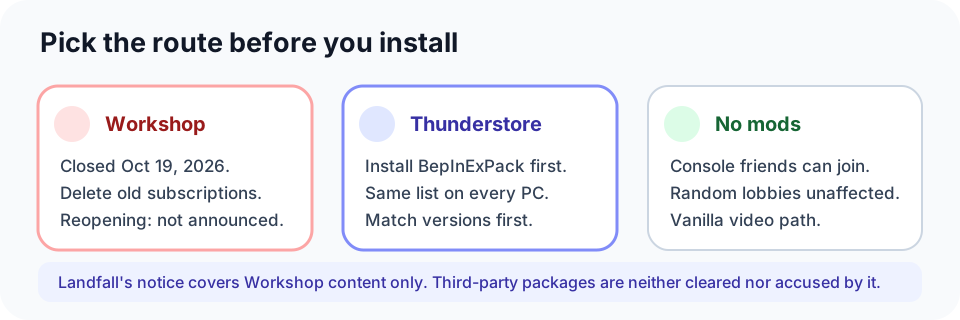
Three install paths, one of which is closed
| Path | Available now | Who can use it | What to watch |
|---|---|---|---|
| Steam Workshop subscription | No. Disabled October 19, 2026 | PC only | Landfall recommends deleting mods already downloaded from the Workshop while its review continues |
| Thunderstore package through a mod manager | Yes | PC only | Not reviewed by Landfall. Missing dependencies, version drift, and profile mix-ups are on you to check |
| No mods | Yes | PC plus console crossplay | You lose mod features, but matchmaking and video extraction stay on the vanilla path |
"PC only" is not a guess: the loader these packages need is a Windows build, and Workshop subscriptions are delivered through the Steam client. A PlayStation, Xbox, or Switch player in the group cannot install either one.
Why the Workshop is offline, and what to do with old subscriptions
Landfall's announcement is short and specific. It says the team disabled the Workshop "after discovering some potentially malicious content," apologises to mod authors, and calls the shutdown temporary while it investigates. It also asks players to delete Workshop mods as a precaution "until further notice."
Two things follow from that wording. First, this is described as a pause, not a removal of mod support, but ten days later there is still no reopening post, so do not plan a session around Workshop items. Second, the request is to delete, not to disable. Landfall's own troubleshooting page makes the same distinction: right-click Content Warning in your Steam library, open Properties, go to the Workshop tab, and delete all mods. Unticking them is not always enough.
The announcement covers Workshop content only. It does not clear third-party packages and it does not accuse them of anything; it simply says nothing about them. Treat a Thunderstore install as your own risk decision rather than an approved alternative.
Installing through Thunderstore
Every Thunderstore package for this game sits on top of BepInExPack (currently 5.4.2305), the loader that injects mod code at launch. The pack page gives two routes.
- Automated, and the one the page recommends: install r2modman or Thunderstore Mod Manager, press "Install with Mod Manager" on the pack page, then launch the game from the manager.
- Manual: extract the downloaded archive into an ordinary folder first — the page explicitly says not to extract it into the game folder — then move the contents of the
BepInExPackfolder into the directory that holds the game executable, and launch. A BepInEx console window appearing on the desktop is the success signal.
Manual installs sit outside the manager's records, so a later update means replacing files yourself. If more than one person in the group is setting this up, have everyone use the manager: it keeps each person's package list in one profile, which is what the version check below depends on.
Who actually needs the mod
Landfall splits mods into two compatibility labels, and the label decides whether strangers can end up in your lobby.
- Vanilla compatible mods are ones other players cannot notice, such as a mod that changes where your videos are saved. The FAQ says these do not affect matchmaking.
- Not vanilla compatible mods put you in a separate pool. If you search for a random game with one installed, you are only matched with players running the same mods, so an empty search can simply mean nobody else had that set.
Private lobbies work differently. Compatibility is not checked there at all, so friends with different mod lists can still play together — but the FAQ warns that some mods require everyone in the lobby to have them before they function. That is why "we can join each other" is not the same test as "the mod works."
Thunderstore's category system carries the same idea in a more usable form: packages are tagged All Clients or Host-Only. Read that tag before you hand a package to four people. A host-only mod on every machine is wasted work; an all-clients mod installed by the host alone will look broken.
Match load order and versions before you host
Load order matters, and the game has no in-game screen for it. Landfall's guidance is to reorder subscriptions in the Steam client under Properties, Workshop, and to put InputAPI at the top, because other mods commonly depend on it. That advice only applies to Workshop items, so it becomes relevant again if the Workshop reopens; while it is closed, ordering is handled inside your mod manager profile.
Version drift is the more common failure. A package updated on three machines and not the fourth is enough to produce a lobby where one player's item or voice behaviour differs. The Thunderstore package ModSync exists for exactly this check: every player's BepInEx list is compared against the host's, and each mismatched player sees one window listing missing mods, extra mods, and version differences. It reports rather than kicks, and it also pulls a short list of host settings, such as a camera mod's clip quality, for the length of the lobby.
One more version trap: several packages on Thunderstore describe themselves as builds for the current Unity 6 version of the game and ship as "Fixed" replacements for older packages that stopped working after the engine change. If a mod's page still points at an original release with no update since, check whether a fixed build exists before assuming your install is broken.
Clean removal and the save-file trap
Removing mods badly is how a group ends up with a game that will not launch even after everything is uninstalled.
- Workshop: delete, do not disable, as described above.
- Thunderstore: some mods survive removal and no longer appear in the manager. Landfall says you may have to delete those files by hand in the game installation folder and check that only the expected files remain. The specific file list on that page is published as an image, so this article does not reproduce it — open the FAQ and compare against the picture rather than a remembered folder layout.
- Save corruption: Landfall records that Thunderstore mods have corrupted save files, and that the corrupted state syncs to Steam Cloud, which leaves the game unplayable after the mods are gone. The reported fix is to delete both the cloud save and the local save. Local saves live in
C:\Users\(your username)\AppData\LocalLow\Landfall Games\Content Warning\Saves, and the FAQ notes you should check that folder even when the game shows no saves.
Quick decision
- You only ever used Workshop mods. They are not available now. Delete them as the developers ask, and play vanilla until the Workshop returns.
- You still want mods today. Use a Thunderstore package through r2modman or Thunderstore Mod Manager, and install the same list on every PC in the group.
- Someone in the group is on console. Plan an unmodded session; mods cannot be installed on that side.
- You are joining random lobbies. Keep the list vanilla-compatible, or accept that you will only meet players running your exact set.
- The game broke after you removed mods. Clear the leftover files, then clear both the cloud and local saves.